
YNAB vs Free Budgeting Apps 2026: Is It Worth It?

The honest question is not "which app is better?" — it is "what does $109 a year actually buy you that $0 does not?" YNAB is the most praised budgeting app in the world, and also one of the most expensive. Free apps, meanwhile, have quietly become good enough that millions of people budget on them without ever paying a penny. This head-to-head settles the argument with real prices, real free-tier limits, and real-number examples — so you can decide in ten minutes instead of trialling four apps for a month each.
What You Actually Pay: The Real Price Table
Every comparison that only lists the monthly price is hiding half the story. The monthly plan, the annual plan, the free trial, and the free tier all matter — because the cheapest way to use an app is rarely the price shown in the biggest font. Prices below were checked against the official sites in October 2026 — YNAB's pricing page, EveryDollar and Goodbudget — app-store prices can differ, so sign up on the app's own website where a trial is offered.
| App | Free plan | Paid plan | Yearly total |
|---|---|---|---|
| YNAB | No — 34-day free trial only | $14.99/month or $109/year | $179.88 monthly / $109 annual |
| EveryDollar | Yes — free zero-based budget, manual entry | Premium $79.99/year or $17.99/month (adds bank connections) | $0 free / $79.99 Premium annual |
| Goodbudget | Yes — 10 regular + 10 annual envelopes | Plus (paid) — removes envelope limits, more accounts and history | $0 free / Plus price on Goodbudget's site |
| PocketGuard | Yes — spending tracking and safe-to-spend view | Plus (paid) — adds bill tracking, custom categories, more history | $0 free / Plus price on PocketGuard's site |
| NerdWallet | Yes — spending, cash flow and credit-score tracking | No paid budgeting tier | $0 |
Three facts jump out. First, the gap between YNAB monthly and YNAB annual is large: $179.88 versus $109 is a $70.88 saving for paying once a year — but only commit to annual once you know you will actually use it weekly. Second, EveryDollar Premium ($79.99 a year) is the only paid alternative in this list that undercuts YNAB annual by a clear margin ($29.01 a year less), and it exists mainly to add the bank connections the free tier lacks. Third, the free tier is not a demo for EveryDollar, Goodbudget, PocketGuard or NerdWallet — it is a complete, permanent budget you can run for years without paying.
One more price fact that matters for households: one YNAB subscription covers up to six people (YNAB Together). Split between two partners, the annual plan costs about $4.54 per person per month. A free app split between two people still costs $0, but if you were going to pay anyway, sharing changes the maths considerably. Our full YNAB review 2026 works through the price in detail, including the free 12-month College Program for eligible students.
Head-to-Head: YNAB vs EveryDollar vs Goodbudget vs PocketGuard
Price is only one axis. The table below compares what each app actually does, because a free app that does the wrong job is not a bargain — it is a distraction. "Bank sync" means the app connects to your bank and imports transactions automatically; without it, you type transactions in by hand.
| Feature | YNAB | EveryDollar (free) | Goodbudget (free) | PocketGuard (free) |
|---|---|---|---|---|
| Budgeting method | Zero-based, Four Rules | Zero-based | Envelope budgeting | Safe-to-spend tracking |
| Bank sync | Yes (Direct Import) | No — Premium only | No — manual entry | Yes, on free tier |
| Give every pound/dollar a job | Yes — the core of the method | Yes | Yes — envelopes | No — it shows what's left |
| Debt payoff planning | Yes, built into targets | Yes, via Baby Steps structure | No dedicated tool | No dedicated tool |
| Bill and subscription tracking | Yes, via scheduled transactions and targets | Basic | Yes, via annual envelopes | Yes — a genuine strength |
| Best for | Overspenders, debt payoff, irregular income | Zero-based budgeting on $0 | Envelope lovers, cash-style budgeting | People who mainly overspend by accident |
Read the table by row, not by column. If automatic bank sync is non-negotiable for you, the free field narrows fast: PocketGuard syncs free, NerdWallet tracks free, and YNAB syncs as part of its subscription — while EveryDollar free and Goodbudget free both require manual entry. If the envelope method is what finally clicks for you, Goodbudget free is the closest free match to YNAB's category system, and no other free app in this list replicates it as faithfully. If you want the strictest plan, EveryDollar free gives you YNAB-style zero-based budgeting for nothing — you pay only in the time it takes to enter transactions by hand.

What YNAB's Method Does That Free Apps Don't
YNAB's price buys a method, not just an app. The Four Rules are: give every dollar a job, embrace your true expenses, roll with the punches, and age your money. In plain English: you only budget money you actually have, you save monthly for irregular bills (car insurance, Christmas, annual subscriptions) instead of being ambushed by them, you move money between categories when you overspend instead of pretending it didn't happen, and over time you build a buffer so you are spending last month's income, not this month's paycheck the day it lands.
Free apps cover parts of this. EveryDollar covers "give every dollar a job" completely — that is literally zero-based budgeting, and our zero-based budgeting guide teaches the same system without any app at all. Goodbudget covers the envelope half of it beautifully: when an envelope is empty, spending in that category stops unless you consciously move money from another envelope. PocketGuard covers the "what can I safely spend today?" question better than YNAB does, because that single number is its whole product.
What no free app in this list replicates in full is the combination: YNAB's credit-card handling (where a card purchase moves money from the spending category to a card-payment category, so the payoff is always funded), its target system for true expenses, and its "age of money" discipline, all in one workflow with bank sync. That combination is why people who have failed with three free apps sometimes succeed with YNAB — not because the app is magic, but because the workflow closes the loopholes their previous system left open. The catch, stated plainly: the workflow only works if you open the app at least twice a week. A paid app you ignore is just another forgotten direct debit, and it is worse than a free app you use.
The Free Apps, One by One: Who Each One Suits
EveryDollar (free) — the closest free YNAB
EveryDollar comes from Ramsey Solutions, and it is the most direct free substitute for YNAB's core idea: assign every dollar of income to a category until nothing is unassigned. The free tier gives you a clean zero-based budget with categories, amounts, and manual transaction entry. Its limits are deliberate: bank connections live behind Premium ($79.99 a year), so free users enter transactions by hand. That sounds like a drawback, and for busy people it is — but manual entry is also why some users finally notice their spending: typing in every takeaway forces you to look at it. Choose EveryDollar free if: you want zero-based budgeting, you follow or like the Ramsey Baby Steps structure, and you will tolerate manual entry. Our roundup of free budgeting apps for beginners places it first for exactly this user.
Goodbudget (free) — the envelope app
Goodbudget is the app for people who think in envelopes: groceries envelope, transport envelope, fun envelope. The free tier gives you 10 regular envelopes plus 10 annual envelopes, syncing across devices, and sharing with one other household member. Ten envelopes sounds small until you try it — most beginners only need eight to twelve categories anyway, and the constraint itself teaches prioritisation. Annual envelopes are the hidden gem: put one-twelfth of your yearly car insurance into an envelope each month and the bill stops being a crisis. Choose Goodbudget free if: you like cash-style discipline, you budget as a couple or household, or you have fewer than ten spending categories and want the simplest possible system.
PocketGuard (free) — the "can I afford this?" app
PocketGuard answers one question extremely well: how much can I safely spend right now? It subtracts bills, goals, and scheduled spending from your income and shows a single spendable figure. It syncs bank accounts on the free tier, which makes it the strongest free option for people who will not do manual entry. Its weakness is depth: it does not run a full zero-based or envelope system, so it will not teach you to plan irregular expenses the way YNAB or Goodbudget do. Choose PocketGuard free if: your problem is accidental overspending (not planning), you want bank sync without paying, and you mainly need a guardrail rather than a full budget.
NerdWallet (free) — the tracker, not the planner
NerdWallet is free, US-focused, and genuinely useful — but it is a tracker first and a planner second. It shows spending, cash flow, and your credit score in one place, which makes it a good companion app. It is not a substitute for YNAB's method: it will not force you to assign every dollar before the month starts. Choose NerdWallet free if: you are in the USA, you want spending visibility plus credit tracking for $0, and you pair it with a simple plan (like the 50/30/20 rule) rather than expecting it to plan for you. And if you want no app at all, a spreadsheet running zero-based budgeting is free forever — it just costs you the setup hour and the weekly discipline.
The Free-Tier Limits Nobody Puts in the Headline
Free tiers are honest products, but their limits only show up after a month of use. Here are the ones that actually cause people to quit — and the workaround for each, so you can judge before you commit.
- EveryDollar free: no bank sync. Every transaction is manual. Workaround: enter spending once a day (five minutes) instead of once a week, or upgrade to Premium for $79.99 a year if manual entry is the reason you would quit. Quitting over manual entry and paying nothing is worse than paying $79.99 and staying on track.
- Goodbudget free: 10 regular envelopes. If you genuinely need more categories, you will hit the wall in month two. Workaround: group small categories ("household" instead of separate cleaning, toiletries, and home lines) — or accept that needing 20 envelopes usually means the budget is overcomplicated, not underpowered.
- PocketGuard free: limited history and customisation. Deeper bill tracking, custom categories, and longer history sit behind Plus. Workaround: if you only need the safe-to-spend number, the free tier is complete; if you need a full plan, pair it with a spreadsheet rather than paying for a second app.
- All free apps: your data is the business model in some cases. Free apps earn money from premium upgrades, referrals, or (for NerdWallet) financial product recommendations. That is not a reason to avoid them, but it is a reason to read what data you are sharing and to never link an account you are uncomfortable connecting. YNAB, by contrast, earns only from subscriptions — which is part of what the $109 buys.
- YNAB's hard stop. Stop paying and you lose access to the app. Export your budget data before cancelling, and remember the method itself works in a spreadsheet — the subscription buys convenience and workflow, not a secret you cannot replicate.
The pattern is consistent: free limits are about automation and depth, not about whether you can budget. A free app user with a weekly 15-minute check-in beats a YNAB subscriber who opens the app twice and forgets it. Our spending-tracking guide shows how to run that weekly check-in in any app.
UK vs USA: Currency, Bank Connections, and Availability
🇬🇧 UK users
YNAB works in pounds, but it is priced in US dollars — so your pound cost moves with the exchange rate and your card's foreign-transaction fees. Direct Import supports select UK banks through YNAB's European open-banking provider, so test your own bank during the 34-day trial before paying. Goodbudget works in any currency and is arguably the most UK-friendly free option here, because envelope budgeting needs no bank connection at all. EveryDollar and NerdWallet are US-built: they work as manual budgets in the UK, but their bank connections and credit features are US-focused. For free, impartial UK guidance, the MoneyHelper budget planner is worth a look alongside any app.
🇺🇸 USA users
USA users get the full menu: YNAB at exactly $14.99 or $109 (plus tax where applicable), EveryDollar with full US bank connections on Premium, PocketGuard with US bank sync free, and NerdWallet with US credit-score tracking free. The decision in the USA is therefore purely about method, not availability. If you bank with a smaller credit union, still test the connection during the trial — sync coverage varies by institution in both countries, and a manual-entry app you use beats a syncing app that cannot see your bank.
The UK verdict in one line: if your UK bank imports cleanly into YNAB, the experience is nearly identical to the US one; if it does not, and you hate manual entry, Goodbudget free or PocketGuard (where supported) is the better buy. The USA verdict is simpler: pick by problem (see below), because availability does not decide it for you.
Pick by Your Problem, Not by the App Store Rating
App-store stars measure popularity, not fit. Use this table instead — find your problem, then take the recommendation, even if it is not the app you expected.
| Your problem | Start here | Why |
|---|---|---|
| "I overspend and don't know where it goes" | YNAB trial, or EveryDollar free | You need a plan before spending, not a report after it |
| "I need to stop impulse spending" | Goodbudget free | Empty envelope = visible stop sign, no willpower required |
| "I just need to know what I can spend today" | PocketGuard free | One safe-to-spend number, bank sync included |
| "I'm paying off debt and every dollar counts" | YNAB trial, or EveryDollar free | Both force debt payments into the plan before fun money |
| "My income changes every month" | YNAB trial | Budgeting only money in hand is built for irregular income |
| "I already save well and just want visibility" | NerdWallet free, or a spreadsheet | Paying $109 to organise what already works is a luxury, not an investment |
| "I budget as a couple and fight about money" | Goodbudget free, or YNAB Together | Shared envelopes (free) or a shared subscription for up to six people |
Two rows deserve emphasis. Irregular income is YNAB's strongest case: its Rule 1 (only budget money you have) removes the guesswork that breaks most monthly budgets, and our irregular income guide explains the same principle for any app. And debt payoff is the row where paying can genuinely pay for itself: pair whichever app you choose with a payoff order — our debt snowball vs avalanche guide shows which order saves more — and a subscription that shortens the payoff by even a few weeks has earned its price.

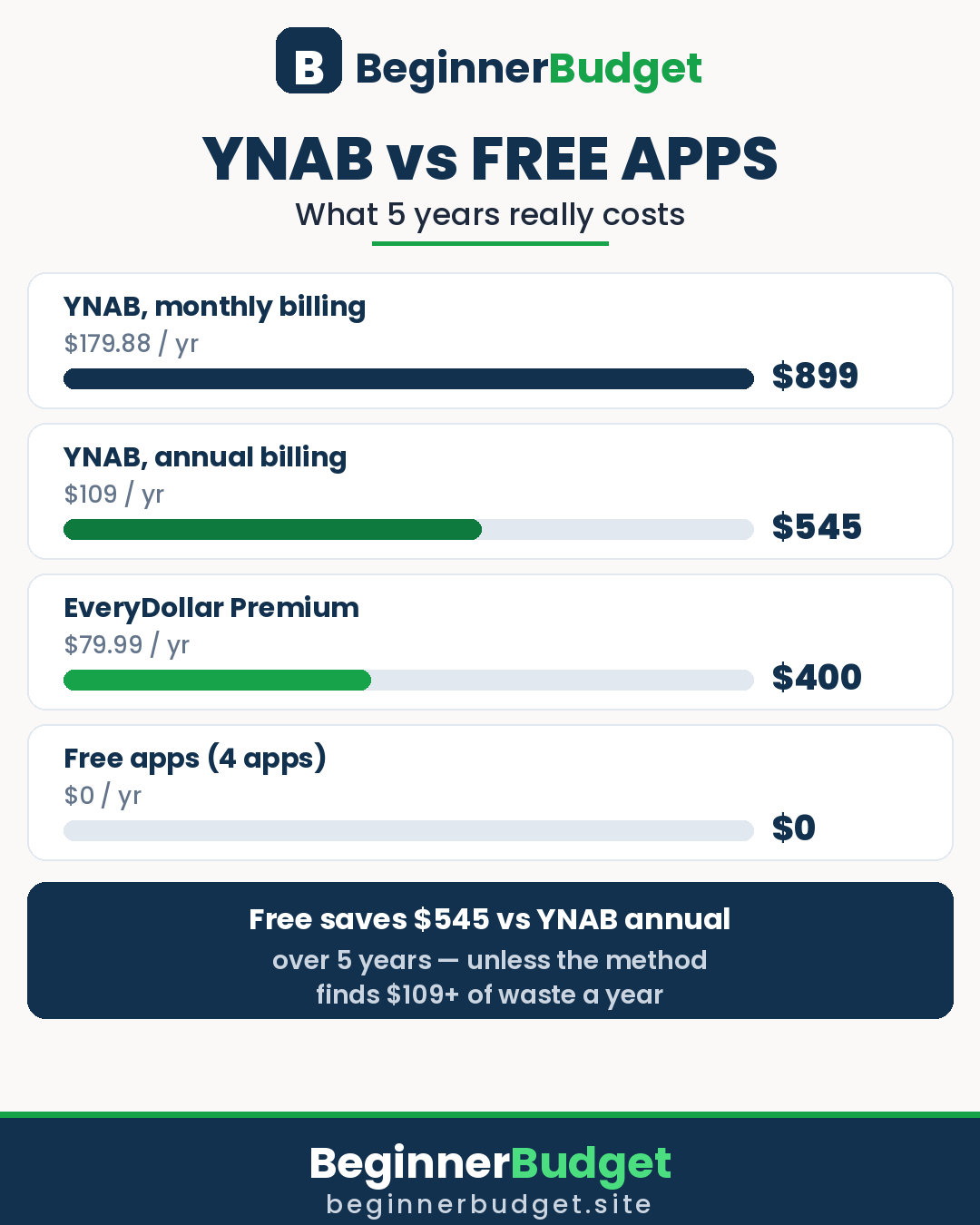
The 5-Year Math: What $109 a Year Really Costs
Monthly prices hide the long-term cost. Over five years, the totals are stark — and they are the numbers that should decide a multi-year habit, not a single month's price.
| Option | Per year | 5-year total | What you give up |
|---|---|---|---|
| YNAB, monthly billing | $179.88 | $899.40 | Almost $900 for the same app annual users get for $545 |
| YNAB, annual billing | $109 | $545 | $545 that could sit in an emergency fund |
| EveryDollar Premium, annual | $79.99 | $399.95 | $145 less than YNAB annual over five years |
| EveryDollar, Goodbudget, PocketGuard or NerdWallet — free tier | $0 | $0 | Bank sync (EveryDollar/Goodbudget) or depth (PocketGuard/NerdWallet) |
Now run the break-even test, with worked examples. Example 1 — the overspender. Suppose you currently leak about $150 a month on takeaways, impulse buys, and forgotten subscriptions. If YNAB's weekly check-in catches $60 of that in month one, the annual plan ($9.08 a month) is covered more than six times over — and over five years, the $545 subscription is dwarfed by the waste it prevents. Example 2 — the disciplined saver. Suppose you already save 20% of your income and rarely overspend. YNAB is unlikely to find $109 of new waste a year, because there is not $109 of waste to find — so the five-year $545 is a convenience purchase, and a free app is the rational choice. Example 3 — the household. Suppose two partners share YNAB Together at $109 a year, about $4.54 per person per month. If it stops one $30 impulse argument-purchase a month, it pays for itself twice over; if neither partner opens it, it is $545 wasted over five years. The variable that matters is not price — it is engagement. Put the $545 into your emergency fund instead if you will not use the app weekly; that fund is the one purchase no app can replace.
A final cost warning: never pay monthly for a year out of inertia. If you subscribe, set a calendar reminder for day 30 of the trial and for your annual renewal date. Decide on evidence — did you open it twice a week, did it find at least $15 of waste, would you miss it tomorrow? — not by forgetting to cancel.
How to Switch Without Losing Your Budget History
Switching apps is where most people abandon budgeting entirely, because starting from zero feels like failure. It is not — it is a transfer, and it takes one evening if you do it in order.
- Export first, cancel second. Before cancelling any paid app, export your transactions and category history (CSV where offered) and save the file. You lose app access when a subscription ends; you do not have to lose the record.
- Run both apps for one month, not one day. Keep the old app running while you build the new budget with the same categories. One overlapping month catches every category you forgot — the annual subscription, the quarterly bill, the "miscellaneous" line that is secretly groceries.
- Carry over balances, not history. You do not need three years of transactions in the new app. You need today's account balances, this month's spending so far, and your sinking-fund balances (money saved toward future bills). Everything older lives in your export file.
- Rebuild sinking funds on day one. This is the step people skip, and it is why the first month in a new app feels like a crisis: the annual bills arrive and there is no fund for them. List every irregular bill, divide its yearly total by 12, and fund one month's share immediately.
- Decide the weekly check-in before you switch. Pick the day and time (for example, Sunday evening, 15 minutes) and put it in your calendar. The app does not create the habit; the calendar slot does.
If you are switching to YNAB from a free app, use the 34-day trial as the overlap month — it exists precisely for this. If you are switching from YNAB to a free app, do it at a month boundary, not mid-month, so the old budget closes cleanly and the new one starts with a full month ahead of it.
The 30-Day Test: Try Before You Pay (or Don't)
Do not pay for any budgeting app on day one. Run this test instead — it works whether the app is free or on trial, and it gives you a decision based on your behaviour, not on a review (including this one).
- Days 1–3: set up honestly. Link your bank if supported, or import a statement. Assign every pound or dollar you currently have to categories. Budget only money in hand — never next month's pay. If setup takes more than an hour, the app is too complicated for your life right now.
- Week 1: check in daily, five minutes. Approve imported transactions or enter them by hand, and move money when a category goes over. Daily checks in week one build the habit faster than any tutorial.
- Weeks 2–3: switch to twice-weekly. The question to answer: is overspending becoming a visible trade-off instead of a surprise? If yes, the method is working for you. If you dread opening the app, that is also an answer — and it points to a simpler app, not to more effort.
- Week 4: test the hard feature. For YNAB, set up targets for your true expenses. For Goodbudget, test whether 10 envelopes are enough. For EveryDollar free, test whether manual entry still feels tolerable on a busy week. The hard feature is where free tiers and paid apps actually differ.
- Day 30: decide with three questions. Did I open it at least twice a week? Did it find at least $15 of waste or prevent at least one overspend? Would I miss it if it disappeared tomorrow? Two "yes" answers means keep it — and if it is YNAB, subscribe monthly first, then switch to annual only once you are using it weekly. Fewer than two means switch to a free app and keep the money.

The Verdict
Start free. That is the verdict for most readers, and it is not a cop-out — it is the rational default. EveryDollar free gives you YNAB-style zero-based budgeting for $0, Goodbudget free gives you envelope discipline for $0, and PocketGuard free gives you bank-synced guardrails for $0. Run one of them for 30 days with a twice-weekly check-in. If you stick with it and it covers your needs, you have just saved $545 over five years, and you never need to read another app comparison.
Pay for YNAB if — and only if — one of these is true: you overspend regularly and free apps have not changed that; you are paying off debt and need the strictest plan; your income is irregular and budgeting only money in hand would fix your worst month; or you tried a free app for 30 days, liked the method, and hit a specific limit (bank sync, credit-card handling, targets) that only YNAB removes. In that case, start with the 34-day trial, subscribe monthly first, and move to the $109 annual plan only when weekly use is a fact, not a hope. And if you are a student, check the free 12-month College Program before paying anything — it removes the price objection entirely.
Whichever you choose, the app is the smaller half of the system. The larger half is the weekly 15-minute check-in, the sinking funds for irregular bills, and the honest category list. Get those right in a free app and you beat a paid subscriber who never opens theirs — every single month. For the deeper method behind all of this, start with our beginner's budgeting guide and our USA budgeting apps roundup, then let your own 30-day test make the final call.
💰 Try it: turn this budget into a daily number with our free Safe-to-Spend calculator — what you can spend today, until payday.
Frequently Asked Questions
Is YNAB worth it vs free budgeting apps?
Yes, if you overspend, carry debt, or have irregular income and you will open it at least twice a week — the method finds more waste than the $109 annual subscription costs for most overspenders. No, if you already save consistently, only want passive spending tracking, or will not open an app regularly — a free app is the better choice then.
Does YNAB have a free version?
No permanent free version — only a 34-day free trial (no credit card required when signing up directly on YNAB's website) and a free 12-month College Program for eligible students. After the trial, you subscribe or lose access to the app.
What is the best free alternative to YNAB?
EveryDollar free is the closest free alternative for zero-based budgeting, and Goodbudget free is the closest for envelope budgeting. If you need free bank sync, PocketGuard free is the strongest choice in this list. Pick by method, not by popularity — the app that matches how you think about money is the one you will keep using.
Is EveryDollar really free?
Yes — the free version is a complete zero-based budget with manual transaction entry. Premium ($79.99 a year or $17.99 a month) adds bank connections and a few extra features, but you can budget permanently on the free tier without paying.
Is Goodbudget free enough for a beginner?
For most beginners, yes: 10 regular envelopes plus 10 annual envelopes cover a typical household budget, and the free tier syncs across devices and shares with one other person. If you need more than 10 regular envelopes, group small categories together first — needing 20 envelopes usually means the budget is overcomplicated.
Can I use YNAB in the UK?
Yes. You budget in pounds, and Direct Import supports select UK banks through YNAB's European open-banking provider. Prices are in US dollars, so your pound cost varies with the exchange rate and your card's foreign-transaction fees. Test your own bank's import during the free trial before subscribing.
What happens if I cancel YNAB?
You keep access until the end of your paid period, then lose access to the app. Export your budget data before cancelling if you want to keep your history — and remember that the method itself (zero-based budgeting, sinking funds for true expenses) works in a spreadsheet too.
Should I pay monthly or annually for YNAB?
Monthly first ($14.99), even though it costs more over a year. Switch to annual ($109, about $9.08 a month, saving $70.88 versus monthly) only once weekly use is a proven habit. Paying annually for an app you abandon in month two is the most expensive option of all.