
Monzo vs Starling for Budgeting: Which Wins in 2026?

Quick answer: For budgeting alone, Monzo wins — its Pots, Salary Sorter and spending targets do more of the work for you than Starling's Spaces. But Starling wins on flexible savings for the first 6 months, cheaper overdrafts, and better travel cash limits. If you only want one account, pick Monzo for budgeting; if you already budget fine and want the best rates, Starling edges it. Opening both is free, and honestly, that's what a lot of people end up doing.
Monzo and Starling are the two names that come up in every "best UK bank account" conversation, and for good reason. Both are free, both live entirely in your phone, and both hold full UK banking licences — which means your money is covered by the Financial Services Compensation Scheme up to £120,000 if either bank fails. The real question isn't which one is "better" in some abstract sense. It's which one's budgeting tools match the way you actually handle money. And on that question, the two apps genuinely differ.
Here's the short version of how this plays out in real life. Monzo is the app that budgets for you: payday arrives, your money splits itself into pots, and you get told when you're burning through your eating-out budget too fast. Starling is the cleaner, quieter app: fewer features, but the ones it has — Spaces with their own virtual cards, a genuinely good savings rate for six months, and no fees on spending abroad — are done really well. Neither charges a monthly fee for its standard account, so the choice costs you nothing to get wrong. You can even run both, which is exactly what I'll suggest at the end.
Monzo vs Starling at a glance
Both accounts are free, both are app-only, and both do the basics brilliantly: instant notifications, freezing your card in the app, fee-free card spending abroad, and round-ups that sweep your spare change into savings. The differences show up one layer down, in the tools around the account.
| Feature | Monzo | Starling |
|---|---|---|
| Monthly fee (standard account) | Free | Free |
| Budgeting system | Pots + Salary Sorter + Trends + spending targets | Spaces + Bills Manager + spending insights |
| Automatic payday split | Yes — Salary Sorter | No — Spaces are filled manually |
| Separate card per budget pot | Yes, on paid plans (virtual cards) | Yes, free — a virtual card per Space |
| Instant-access savings rate | 2.75% AER (free account) | 4.00% AER Easy Saver (includes 6-month bonus) |
| 1-year fixed savings | 4.70% AER, from £500 | 4.20% AER, from £2,000 |
| Arranged overdraft | 19%, 29% or 39% EAR | 15%, 25% or 35% EAR |
| Cash abroad (outside Europe) | £200/month free, then 3% | £300/day free, no monthly cap |
| Paid plans | Extra £3, Perks £9, Max £19/month | None — one free account for everyone |
| Customer support | In-app chat | 24/7 UK-based human support |
| FSCS protection | Up to £120,000 | Up to £120,000 |
| Customers | 16 million+ (personal + business) | 3.5 million+ |
Rates and fees change — banks tweak them several times a year — so treat the numbers above as a snapshot from October 2026 and check the bank's own page before you commit. The shape of the comparison, though, has held for years: Monzo builds more budgeting features, Starling keeps the account simpler and cheaper at the edges.
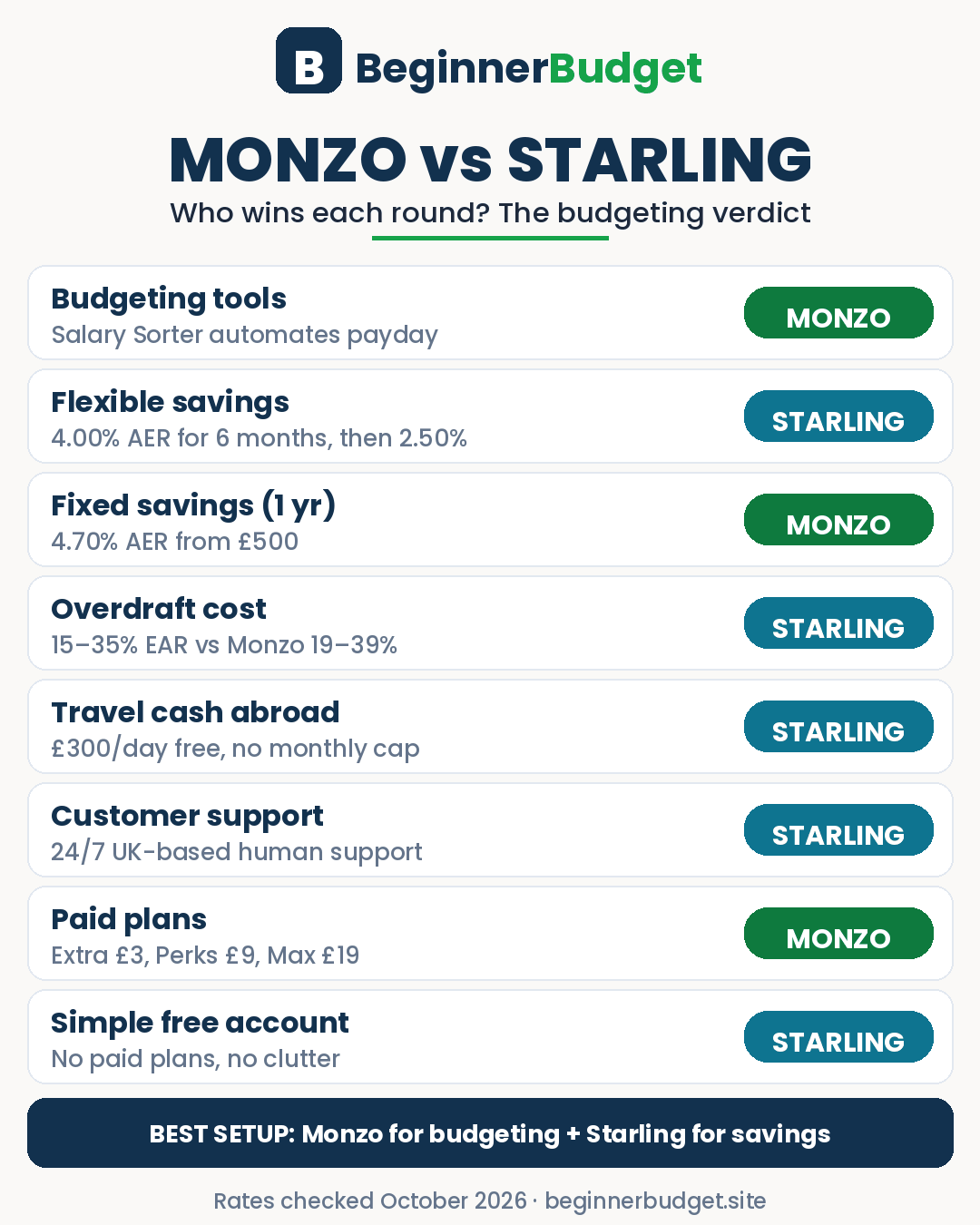
Budgeting tools: where Monzo pulls ahead
This is the section that decides the headline verdict, so let's get specific about what each app actually does when payday lands.
Monzo's system works like this. Your salary hits the account and Salary Sorter kicks in: it splits the money automatically across your Pots — bills, groceries, fun money, savings — before you get a chance to spend it. Direct Debits can be paid from a dedicated bills Pot, so your main balance shows what you can actually spend, not what you need to keep for the electricity bill. On top of that, Trends shows your spending by category over time, you can set a target for each category (say £250 a month on groceries), and the app warns you as you approach it. Round-ups sweep the spare change from every card payment into a savings Pot. And if you're paid by BACS, Get Paid Early lets you claim your salary from 4pm the day before payday — handy when payday falls on a Monday and the weekend is staring at you.
Starling's system is simpler. Spaces work like Pots: you ring-fence money for bills, holidays, or a new laptop, separate from your main balance. Bills Manager pays your Direct Debits and standing orders from a designated Space, so the same "bills are already covered" trick works here too. Spending insights categorise your payments automatically, and round-ups work the same way. The genuinely clever Starling-only feature is the virtual card: every Space can have its own virtual debit card number, so you can pay for groceries only from your groceries Space. Spend from the wrong pot and the card simply declines — it's budgeting with guardrails instead of willpower.
So why does Monzo still win this section? Because of the automation gap. Starling's Spaces have to be fed by hand: you move money into them yourself, every payday, and if you forget or get busy, the system quietly stops working. Monzo's Salary Sorter does it for you, every single payday, without you thinking about it. That's the difference between a budgeting system and a budgeting intention. MoneySavingExpert's digital banking guide, updated in October 2026, lands in the same place: it credits Monzo with the best budgeting tools of any UK app bank, while naming Starling its top all-rounder.
One honest caveat, though. If you find Monzo's feature list noisy — Pots, Trends, targets, connected accounts, cashback, investments, pensions, all shouting at once — Starling's calmer app is a real quality-of-life win. Some people budget better in a quiet app they actually open than in a powerful app they avoid. Know yourself on this one.

Setting up a budget in each app, step by step
Features on a comparison table are one thing. Here's what the first 30 minutes actually look like in each app, because this is the part most comparisons skip — and it's the part that decides whether you'll still be using the system in three months.
Setting up Monzo:
- Open your account (ID + a short video selfie; most people are up and running the same day) and switch your salary to it, or just start with whatever balance you transfer in.
- Create Pots for your fixed costs: Bills, Rent, Groceries, Transport, Fun Money, Savings. Name them exactly how you think about them — "Bills" beats "Essential Outgoings" because you'll actually recognise it at a glance.
- Turn on Salary Sorter and tell it how much goes to each Pot on payday. From now on, payday sorts itself.
- Point your Direct Debits at the Bills Pot so your main balance only ever shows spendable money.
- Set one spending target for the category you overspend most — for most people that's eating out or groceries — and leave the rest alone for the first month.
- Turn on round-ups into a savings Pot. It's pennies per payment, but it adds up to a small buffer without any effort.
Setting up Starling:
- Open your account (same ID + selfie process) and move your spending across.
- Create Spaces for Bills, Groceries, Fun Money and Savings, and turn on Bills Manager so Direct Debits come out of the Bills Space.
- Move your payday money into Spaces by hand — or set up a standing order from your main balance into each Space on payday, which is the closest Starling gets to automation.
- Give your Groceries Space its own virtual card, and use that card (via Apple Pay or Google Pay) for your food shopping. When the Space is empty, the card stops — that's your guardrail.
- Open an Easy Saver Space for flexible savings while the bonus rate runs, and set a diary reminder for when the bonus ends (see the savings section below).
Notice the pattern: Monzo's setup takes longer to configure and then runs itself; Starling's setup is quicker and then needs a small manual habit each payday. If you love systems, that's a point for Monzo. If you hate setup screens, Starling's simplicity might be the reason you actually stick with it. If you're starting your first budget from scratch, our beginner's budgeting guide walks through the numbers themselves — how much to put in each pot — and the 50/30/20 rule gives you a simple split to start with.
Savings and interest: the £10,000 test
Budgeting tools decide the headline, but savings rates decide real pounds. Here's where Starling's headline rate needs a closer look, because it's brilliant for six months and ordinary after that.
Starling's Easy Saver pays 4.00% AER on instant-access savings, but 1.50% of that is a bonus that runs for your first six months only (on balances up to £25,000). A new customer who opens the Easy Saver within 30 days of opening a current account gets a 2.50% bonus instead — 5.00% in total. From month seven, the rate drops to 2.50%, which is below Monzo's free-account rate. Starling also scrapped interest on current account balances in early 2025, so the Easy Saver is the only place flexible savings earn anything.
Monzo's free account pays 2.75% AER on instant-access Pots — no bonus, no cliff edge, no diary reminder needed. Its paid plans lift that rate: 3.00% on Extra (£3/month), 3.25% on Perks (£9/month), 3.50% on Max (£19/month). For money you can lock away, Monzo's one-year Fixed Rate Pot pays 4.70% AER from just £500 and allows early closure (you give up some interest). Starling's one-year Fixed Saver pays 4.20% AER, needs £2,000 minimum, and takes no top-ups and no early withdrawals.
| £10,000 saved for one year | What it earns (approx.) |
|---|---|
| Starling Easy Saver (new customer, 5.00% for 6 months then 2.50%) | ~£375 |
| Starling Easy Saver (existing bonus, 4.00% for 6 months then 2.50%) | ~£325 |
| Monzo free instant-access Pot (2.75% all year) | ~£275 |
| Monzo 1-year Fixed Rate Pot (4.70%) | ~£470 |
| Starling 1-year Fixed Saver (4.20%) | ~£420 |
The table is an illustrative example using the published rates, not a promise — rates move, and AER assumes the money stays put all year. But the lesson is clear: park flexible savings in Starling's Easy Saver while the bonus runs, then move it when the bonus ends; lock money away for a year in Monzo's fix, not Starling's. And if you only want one home for your savings and hate rate-chasing, Monzo's steady 2.75% with no cliff edge is the lower-maintenance choice. If you're building your first safety net, our emergency fund guide covers how much to save before you worry about which account pays the most.

Overdrafts: Starling is cheaper at every tier
Neither bank's overdraft is cheap — let's be blunt about that first. But if you do use one, Starling undercuts Monzo by four percentage points at every tier: Starling charges 15%, 25% or 35% EAR (Equivalent Annual Rate) depending on your credit profile, against Monzo's 19%, 29% or 39%. Whichever band you land in, Starling's is the cheaper overdraft, and both banks show the running cost in the app as you borrow, so neither springs a surprise at month-end.
The honest guidance, though, is that the cheapest overdraft is the one you don't use. If you regularly run an overdraft, that's usually a sign the budget needs fixing — not a reason to switch banks. Fix the gap first (our spending-tracking guide shows five methods for finding where the money actually goes), and treat the overdraft comparison as a tiebreaker, not a reason to move.
Travel and cash abroad
For card spending abroad, it's a dead heat: neither bank charges a foreign transaction fee, and both pass on the Mastercard exchange rate. Tap your card in Paris or New York and the experience is identical.
Cash is where they part company, and only outside Europe. Inside the European Economic Area, both are free and unlimited — Monzo's only if it's your main account. Outside it, Monzo gives you £200 a month of free cash withdrawals, then charges 3%. Starling gives you £300 a day, free, with no monthly cap. If you travel cash-heavy — markets, taxis, tips, places where cards aren't welcome — Starling's allowance is the far more generous one, and it's the single strongest reason to keep a Starling account even if Monzo is your main bank.
Monzo's paid plans: are Extra, Perks or Max worth it?
Starling has no paid plans at all: every customer gets the same free account. Monzo sells three optional upgrades, and this is where you need to do the maths before you pay anything.
| Plan | Cost | What it adds for budgeting | Worth it if… |
|---|---|---|---|
| Extra | £3/month | Custom categories, virtual cards, connected accounts in-app, higher savings rate (3.00%) | You want virtual cards for Pots or you bank elsewhere too |
| Perks | £9/month | Everything in Extra, plus cashback, 3.25% savings rate, and a weekly Greggs treat | The cashback + perks beat £108/year for you |
| Max | £19/month | Everything in Perks, plus worldwide travel and phone insurance, 3.50% savings rate | You'd buy travel + phone insurance separately anyway |
The rule of thumb is simple: Extra is the only plan worth buying for budgeting reasons alone, and only if you'll actually use virtual cards or connected accounts. Perks and Max are insurance-and-perks bundles — judge them against what you'd pay for that insurance elsewhere, not against the budgeting features. If you wouldn't buy the insurance anyway, skip them. And remember Starling gives you virtual cards for Spaces free, which takes away one of Extra's main selling points.
Support, safety and the FSCS
Both banks are fully licensed UK banks, not e-money wallets — that's a meaningful distinction. E-money firms ring-fence your money; banks protect it with the FSCS up to £120,000 per person per bank. Both Monzo and Starling carry that protection, so on safety there's nothing between them. (The £120,000 limit is the current FSCS deposit protection level — check the FSCS site for the latest figure.)
Support is where Starling pulls ahead on reputation. Both offer in-app chat as the main channel and neither has branches, but Starling's 24/7 UK-based human support is consistently praised, and in MoneySavingExpert's July 2026 customer-service poll, 84% of Starling customers rated its service "great", against 77% for Monzo. On Trustpilot the scores flip slightly — Monzo 4.6 out of 5, Starling 4.3 — but review-site scores are noisy and self-selecting, so treat them as background, not a verdict. If talking to a human at 2am matters to you, Starling is the safer pick. If you're happy with in-app chat, it's a non-issue.
Joint accounts, kids and business
Joint accounts: both banks offer them, and both let you run Pots or Spaces inside a joint account. If you budget as a couple, the joint account plus personal allowances pattern works well on either app — agree the shared bills together, keep a personal allowance each, and stop policing each other's spending. Our couple budgeting guide covers the full setup.
Kids: both offer accounts or cards for children (Monzo's under-16s account, Starling's debit card for under-16s), so either works if you want your teenager learning with real money and parental controls.
Business: this one's a genuine split. Starling's business account is free for sole traders and includes most features in the free tier, plus a multi-currency business account. Monzo Business has a free Lite plan for basics, with Pro at £9/month adding invoicing, tax Pots (which set aside a percentage of each payment for your tax bill automatically), and accounting integrations with Xero, FreeAgent, Sage and QuickBooks. If you're a freelancer who dreads the Self-Assessment bill, Monzo's tax Pots alone can justify the Pro fee. If you just need a clean free business account, Starling wins.
Switching banks in 7 working days
Here's the part that removes most of the fear from this whole decision: switching is easy, free, and mostly automatic. The UK's Current Account Switch Service moves your balance, Direct Debits, standing orders and incoming payments to your new account within 7 working days, and your old bank redirects anything sent to the old details for three years. You don't have to tell your employer or your bill providers one by one — the service does it.
The practical order is: open the new account first, try it for a month alongside your old one, then run the switch inside the new app when you're sure. If you're switching to Monzo, set up Salary Sorter during that trial month so payday is already sorted when the switch lands. If you're switching to Starling, set up your Spaces and Bills Manager first for the same reason. And if you're not sure which to pick, don't switch at all yet — read the next section instead.
The two-bank system: why many people run both
Here's the honest answer most comparison articles dance around: you don't have to pick one. Both accounts are free, both take minutes to open, and they complement each other almost perfectly. This is the setup I'd actually suggest to most people:
- Monzo as your main account. Salary lands here, Salary Sorter splits it, bills come out of the Bills Pot, and your daily spending runs through it. This is where the budgeting happens.
- Starling as your second account. Keep your flexible savings in the Easy Saver while the bonus rate runs, use it for travel cash abroad, and keep it as your backup if Monzo's app ever goes down or your card is lost.
The cost of this setup is zero, the effort is one extra app on your phone, and it gets you the best budgeting tools and the best flexible savings rate at the same time. The only real downside is a second account to keep an eye on — and if you know you won't check it, then just pick Monzo alone and keep life simple. One account you actually use beats two you forget about.
The verdict: who should pick which
| If you… | Pick… |
|---|---|
| Want budgeting that mostly runs itself | Monzo — Salary Sorter is the deciding feature |
| Want the best flexible savings rate for 6 months | Starling — Easy Saver bonus, then move the money |
| Travel and withdraw cash outside Europe | Starling — £300/day free, no monthly cap |
| Use an overdraft regularly | Starling — cheaper at every tier (but fix the gap first) |
| Want one calm, simple, free account with no upsells | Starling — no paid plans, no clutter |
| Want investing, pensions and credit in one app | Monzo — the one-app-for-everything option |
| Freelance and dread the tax bill | Monzo Business Pro — tax Pots are genuinely useful |
| Want a human on the phone at 2am | Starling — 24/7 UK-based support |
| Can't decide | Both — Monzo for budgeting, Starling for savings and travel |
So: Monzo wins the budgeting comparison, and that's what this article set out to answer. But "wins" here is narrower than the headline suggests. If you already budget well — your money is sorted, your bills are covered, you just want a good free account — Starling is arguably the better bank, full stop. The right question was never "which bank is best?" It's "which bank's strengths cover your weaknesses?" Answer that honestly and the choice makes itself.
If you're still on a traditional high-street bank and this is your first move to an app bank, our guide to opening a bank account online in the UK walks through the ID checks and what to expect. And if you want to see how these two stack up against dedicated budgeting apps rather than each other, our YNAB vs free budgeting apps comparison covers the other side of the same question.
UK vs USA: what changes
Monzo and Starling are UK banks, and neither offers accounts to USA residents — this whole comparison only applies if you live in the UK. If you're in the USA, the equivalent question is which app bank or budgeting app fits your setup, and the answer looks different: US app banks and budgeting apps work around a different system (no Current Account Switch Service, different deposit protection via the FDIC, and payday timing that's usually biweekly rather than monthly). Our best budgeting apps USA guide is the right starting point on that side of the Atlantic. The budgeting principles in this article — automate the payday split, ring-fence the bills, give every pot its own job — transfer directly, even though the banks don't.
Frequently Asked Questions
Is Monzo or Starling better for budgeting?
Monzo, for most people. Its Salary Sorter automates the payday split, and its spending targets and Trends give you more feedback than Starling's Spaces and insights. Starling's Spaces are good — especially with a virtual card per Space — but they need manual feeding every payday, and that's the gap that matters over a whole year.
Are Monzo and Starling free?
Yes, both standard personal current accounts are free with no monthly fee. Monzo sells optional paid plans (Extra £3, Perks £9, Max £19 a month); Starling has no paid plans at all. Neither charges you for opening the account or for standard card spending abroad.
Is my money safe with Monzo and Starling?
Yes. Both are fully licensed UK banks, and eligible deposits are protected by the Financial Services Compensation Scheme up to £120,000 per person per bank. That protection applies to each bank separately, which is another small argument for holding accounts at both.
Can I use Monzo or Starling abroad?
Yes — both are fee-free for card spending abroad at the Mastercard exchange rate. For cash withdrawals outside Europe, Starling is more generous (£300 a day free, no monthly cap) versus Monzo (£200 a month free, then a 3% fee).
Can I have both Monzo and Starling?
Yes, and many people do. A common setup is Monzo as the main budgeting account (Salary Sorter, Pots, targets) with Starling as the second account for flexible savings during its bonus period and for travel cash. Both are free, so the pair costs nothing.
Which has better customer service, Monzo or Starling?
Starling has the edge on reputation: 24/7 UK-based human support, and 84% of Starling customers rated its service "great" in MoneySavingExpert's July 2026 poll, against 77% for Monzo. Monzo's in-app chat is generally responsive too, so for most day-to-day issues you won't notice a difference.
Do Monzo and Starling offer joint accounts?
Yes, both offer joint accounts, and both let you use Pots (Monzo) or Spaces (Starling) inside the joint account. Both also offer accounts or cards for children under 16.